A repeatable checklist for cleaner Shopify listings.
A structured audit framework using five actual product records from the Gerardo Electronic Demo training store, with a dated snapshot, documented title changes, outstanding checks, and spreadsheet files clients can inspect.
CSV spreadsheets open in Microsoft Excel or Google Sheets. The dated records are a work sample, not evidence that the entire store passed quality assurance.
RECRUITER QUICK REVIEW
Case study at a glance
- Task
Create a repeatable product-listing QA workflow for five training-store products.
- Actions
Documented eight checkpoints per product, including title, description, SKU, variants, claims, and inventory status.
- Evidence
40-row checklist CSV, dated Shopify Admin comparisons, and narrated training walkthrough.
- What I Learned
Unverified supplier details, alt text, tags, and stock status remain open checks—not passed QA.
QA work sample · Unresolved items remain clearly marked · No blanket quality certification
Eight essential QA checkpoints
The five title and description edits are documented on the case-study page. The other checkpoints flag records requiring confirmation rather than reporting unsupported passes.
| Checkpoint | What a client expects | Current state |
|---|---|---|
| Product title | Clearly describes the item using verified product facts | Documented change |
| Product description | Matches verified options; removes unsupported promises | Documented change |
| Variants | Labels, options, and included components are accurate | Needs supplier review |
| SKU | SKU present and unique in full catalog | Recorded only |
| Image alt text | Describes actual image rather than filename | Needs review |
| Tags and product type | Consistent classification appropriate for product | Needs review |
| Compatibility & claims | Specific technical or brand compatibility verified | Needs supplier review |
| Inventory tracking | Availability/stock claims reflect confirmed setup | Unverified availability |
Documented title changes
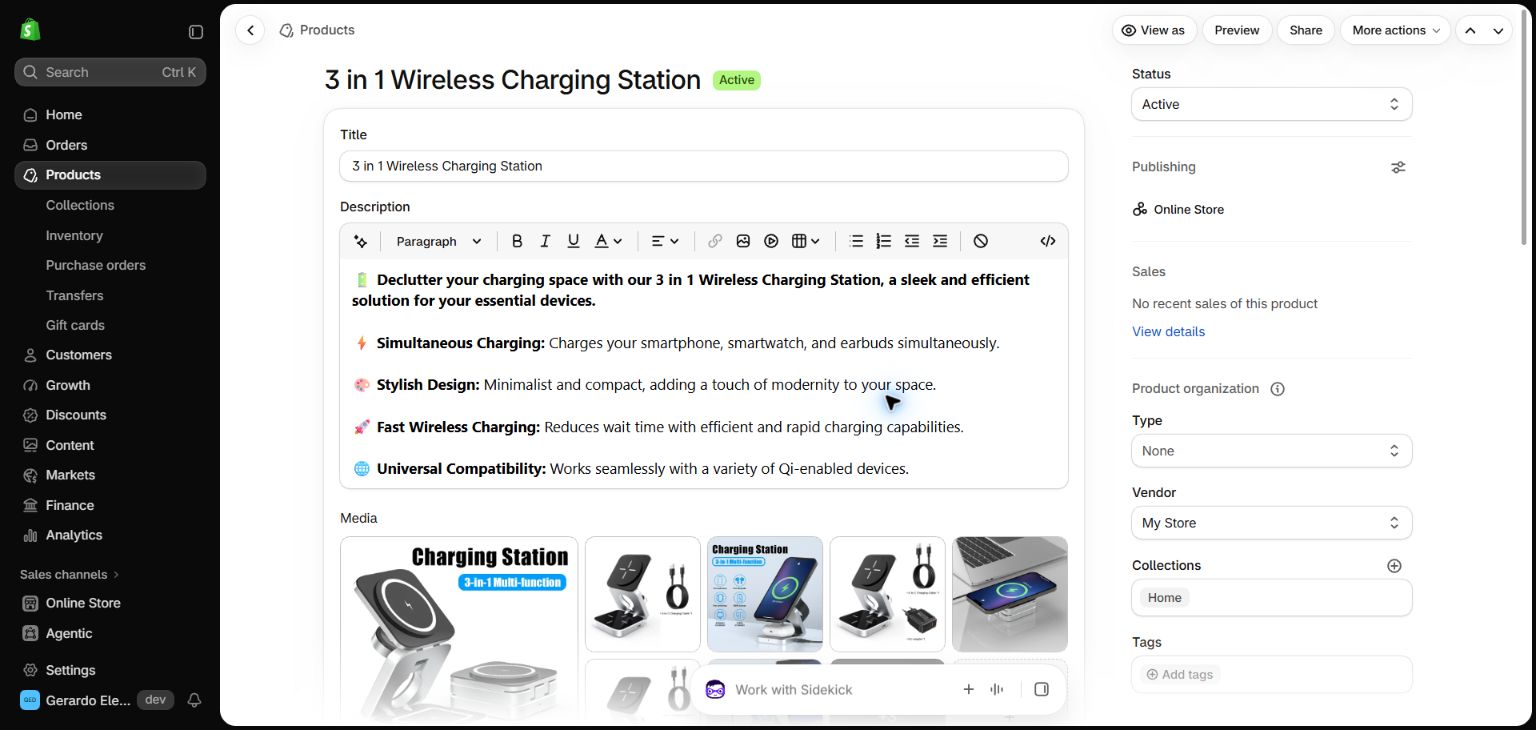
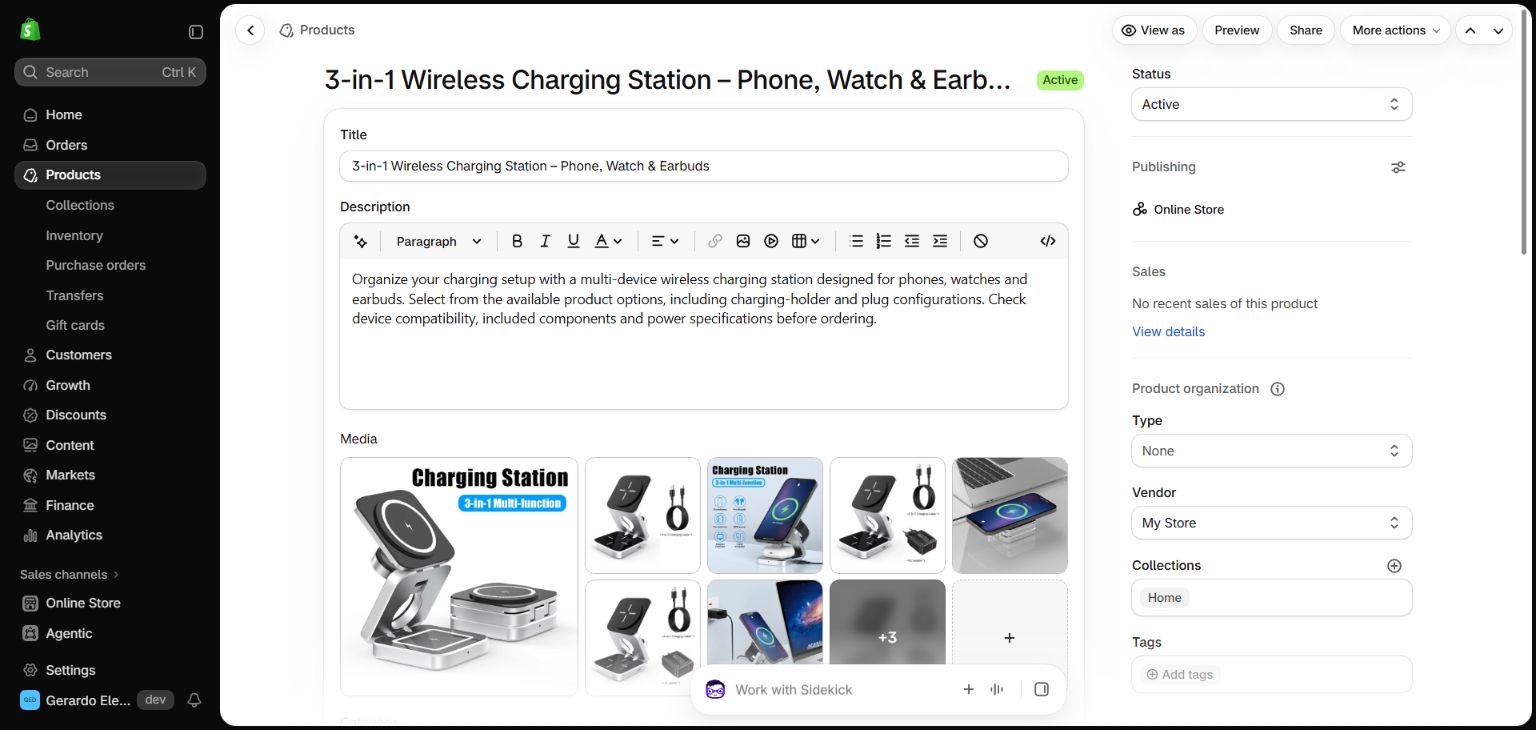
Original Shopify Admin data was captured October 22, 2026. Titles below match the recorded before-and-after evidence in the project case study; this separate checklist does not independently re-query the store.
| Original title | Recorded revised title | Variants | Evidence |
|---|---|---|---|
| 3 in 1 Wireless Charging Station | 3-in-1 Wireless Charging Station – Phone, Watch & Earbuds | 5 | View proof ↗ |
| Bluetooth Earphones | Bluetooth Earphones – Black or White | 2 | View proof ↗ |
| Bluetooth Speaker | Portable Bluetooth Speaker – Pink, Black or Yellow | 3 | View proof ↗ |
| Gamer LED Mouse Pad Waterproof | LED Gaming Mouse Pad – Black, 250 × 350 mm or 300 × 800 mm | 2 | View proof ↗ |
| Airpods Shield Case | Earbuds Dust Shield Accessory – Five Colors | 5 | View proof ↗ |
How this sample can be used by a store owner
- Read the recorded product title, variants, image details and SKU identifiers from the Admin record.
- Check product wording against verified supplier specifications and remove unsupported claims.
- Record the result of each checkpoint, including items that still need review.
- Document approved edits with dated before-and-after evidence and preserve prices, variants and unrelated settings.
- Complete a final owner review before declaring a listing production-ready.
Back to the product case study
View all five before-and-after examples and the original verification notes.